






Website Search

The Eastside Branch Makerspace, located at 3000 Blake James Drive, is a collaborative workspace for ages 13 and up to make, learn , explore, and share, free of charge. Staff are available during open studio hours to assist in projects of all kinds, or contact Makerspace staff to schedule one-on-one help. Not sure where to start? The Eastside Makerspace also offers regular workshops that introduce participants to new skills, technology, and equipment. Planning to bring a group of 10 or more? Please contact us by calling 859-231-5500 ext.2207 or using the link below.
Sample projects
Engrave a welcome sign, 3D print a business card holder, laminate a sign for your classroom, print a banner for your next event, make a personalized magnet for your refrigerator, sew a quilt block, or cut a vinyl design for your water bottle.
The Lexington Public Library is home to four collaborative creative spaces for making, learning, exploring, and sharing. These spaces offer a variety of events, high-tech and low-tech equipment for patron use, and serve as a space to build community, explore your creativity, and develop personal interests.
Sample projects
Film a music video, 3D print a fidget toy, digitize old family photos, sew a costume or mend your favorite pair of pants, embroider a t-shirt, comb bind a book, start a podcast, record in the audio booth, create content with the green screen, make custom magnets or buttons, engrave a keychain, print a poster, make custom stickers, and more.
The Marksbury Family Branch Makerspace, located at 2197 Versailles Road, is an inclusive space where customers of all ages can come to learn, create, and explore together, free of charge. Outfitted with current high-tech and low-tech tools, the Makerspace is designed to promote education and cultivate a do-it-yourself spirit for the whole family. Customers ages 7 and under must be accompanied by a responsible caregiver. Planning to bring a group of 10 or more? Please contact us by calling 859-231-5500 ext.2822 or using the link below.
Sample projects
Engrave a bookmark for your next read, design matching t-shirts for your family vacation, personalize a coffee mug, embroider a t-shirt, or print fun stickers for your new business.
With your free library card, gain access to a diverse collection of print books, ebooks, audiobooks, online classes and databases, and more. You can apply for a traditional, wallet-sized card and key chain tag or a digital library card to add to your smartphone’s digital wallet (iOS and Android compatible).
Download eBooks, audiobooks, magazines, and more – free with your library card.
Several pieces of equipment require additional supplies such as PLA filament, vinyl, and metal backings. Some supplies are available for purchase in our learning spaces. Customers ages 13 and up who have signed the Experiential Learning Agreement and Equipment Use Policy, which is available to sign in-person at any of the four learning spaces, and live in Fayette County or a reciprocal county receive an $8 credit each month for material purchases. If you exceed this credit, you can still purchase additional supplies using credit, Mobile App Pay or Mobile Pay, or tapping to pay.
The Digital Studio provides people of all skill levels the equipment, software, and AI creative tools for filmmaking, photography and digital art, music making, and media preservation.

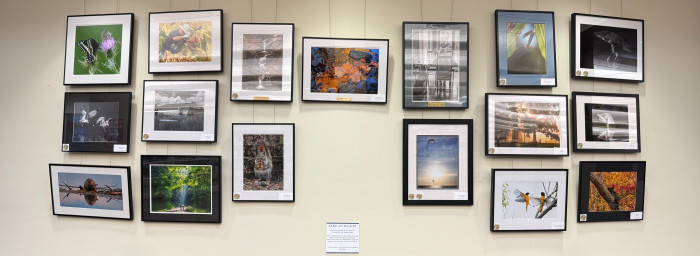
A gallery featuring photography by the Creative Camera Club.
3D print a variety of items. PLA filament must be purchased from staff in the space.
3D printers are able to print items with a maximum size of 9.8 x 8.2 x 8.6 inches.

Friends of the Lexington Public Library provides financial, advocacy and volunteer support to the Library. Shop at the Friends Book Cellar in the Central Library for a great selection of used books, magazines, CDs, DVDs, audiobooks, and vinyl records, all at discounted prices.
The Kloiber Foundation STEAM Lab, located on the fourth floor of Central Library at 140 East Main Street, is a space for youth and families to explore and create using resources and programs related to Science, Technology, Engineering, Art, and Math (STEAM). Customers ages 7 and under must be accompanied by a responsible caregiver. Planning to bring a group of 10 or more? Please contact us by calling 859-231-5500 ext.1147 or using the link below.
Recurring programs
Lego Club, Maker Station, and Open STEAM Play sessions are available for children and families. The STEAM Lab also hosts weekly drop-in events, Homeschool STEAM activities, and special programming during school breaks. Check out the upcoming events listed below.
Celebrate Lexington, Kentucky’s 250th anniversary this April with a full month dedicated to the history and heritage of music, poetry, and literature in and around Lexington with events hosted by the Lexington Public Library, the City of Lexington, 21c Museum and Hotel, the Carnegie Center for Literacy & Learning, Institute 193, and the Pam Miller Downtown Arts Center.
Print your large-format designs on paper and vinyl. Printer size varies by location.
The Eastside Makerspace’s 24” printer is compatible with paper, photo paper, and banner vinyl. The Marksbury Family Branch Makerspace’s 20” printer is compatible with photo paper, sticker paper, banner vinyl, and heat transfer vinyl. Paper and vinyl are available for purchase and are priced per linear foot.

Use these to scan and digitize documents, family photographs, and other print items.
The Northside Digital Studio has 32 GB flash drives that are available for purchase, but you may need to bring additional storage depending on the size of the project.

Print designs for t-shirts, mugs, and more. Please supply your own personal items on which you'll be adding or transferring your design. Sublimation paper (3.5 x 9, 8.5 x 11, and 8.5 x 14 inches) and butcher paper (4 x 9 and 12 x 12 inches) are available for purchase.

You can request a "Bag of Books" to access our materials when you're unable to browse in person. Complete this form, and we'll pull up to 10 items that match your specified interests. You can help us locate more items by keeping your requests general.
Meet with a librarian for one-on-one consultation. Please submit the Book a Librarian Appointment Request Form or call 859-231-5500 during business hours to schedule an appointment. Appointments are scheduled Monday-Friday during Library business hours and typically last 30 to 45 minutes.
The Lexington Public Library offers an Interlibrary Loan (ILL) service which allows cardholders in good standing to borrow books and receive copies of articles we do not own and cannot purchase. Our borrowing network includes over 4,000 participating public and academic libraries.